Follow these simple steps to get this done.
Hello Friends By using this method you can simplify your data fetching work.and impress your colleagues and boss. Import from web into excel, easy data capturing tips, scrape data from web to excel for free, data scraper, how to copy website data without macro
Please follow below mention instruction step by step .
Hello Friends By using this method you can simplify your data fetching work.and impress your colleagues and boss. Import from web into excel, easy data capturing tips, scrape data from web to excel for free, data scraper, how to copy website data without macro
Please follow below mention instruction step by step .
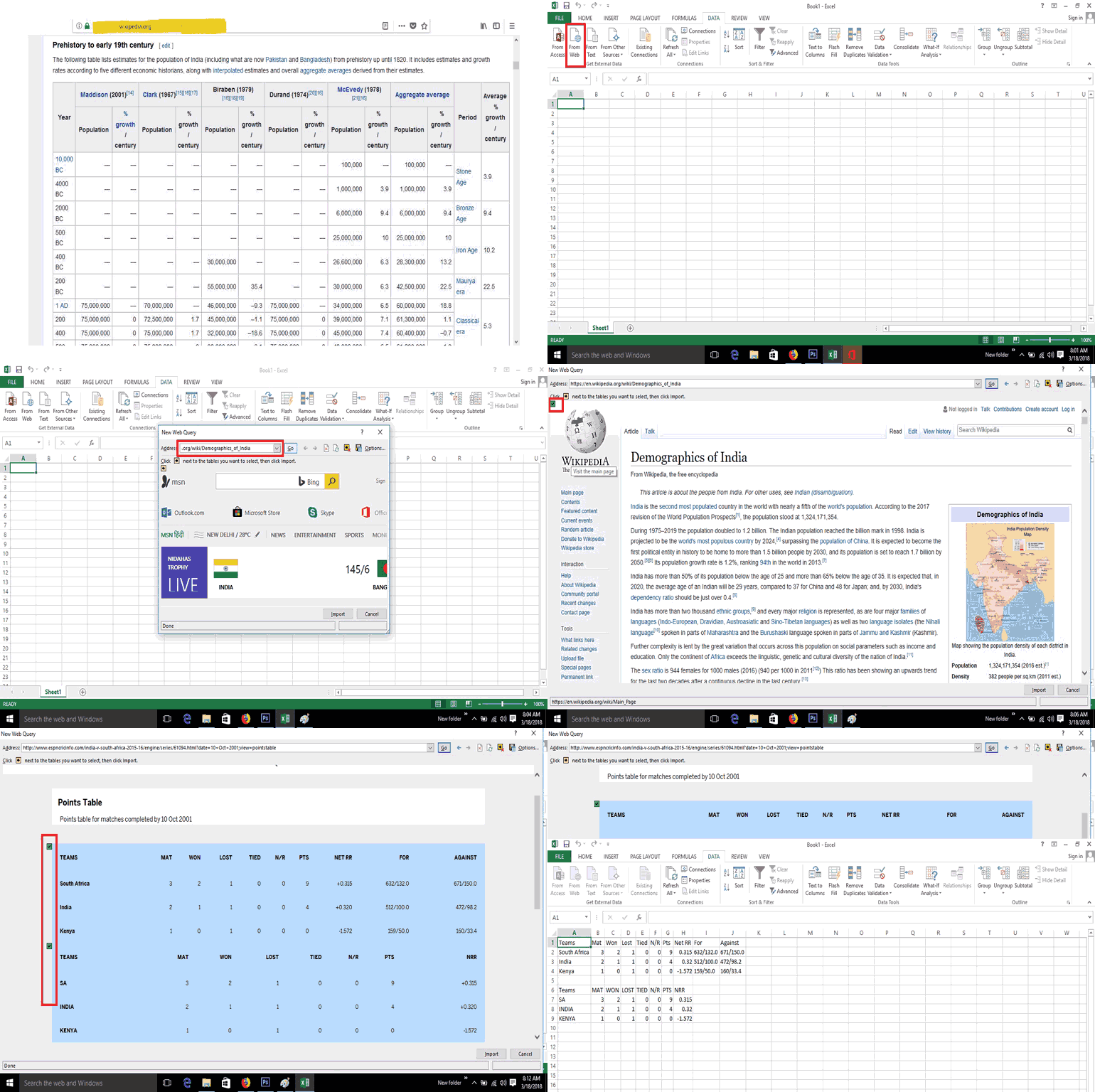
- Copy URL of website which data you want fetch.
- Open Excel and go-to Data Tab.
- Click From Web tab.
- Automatic open Browser Box.
- Paste URL in open browser and click Go button.
- Select cell in excel where are you fetch data .
- click yellow tick box
- Go to import data.
- Now data ready to fetch.

Sir.
ReplyDeleteValuable tip you have given
Hoping to get more tips from you.
Thanking you.
Kanhaiyalal Newaskar.